Up-to-Date Tables, Unlimited Runs, No Wasted Credits: How We Manage Computed Column Dependencies in Revcode

- Engineering
- Inside Revcode
- Quality & performance
What Revcode is
Revcode is an IDE for go-to-market teams. It is a desktop app for any GTM automation or workflow you can think of: building lead lists, keeping your CRM up to date, writing personalized outreach, and more.
You describe what you want to Claude Code or Codex, and the agent builds it: it creates the tables, writes the column functions, connects the providers, and runs everything across the rows, with every result visible in the table as it lands. Every action in Revcode is exposed to the agent. And because it all runs locally on your machine, running your workflows is free.
Every table in Revcode is a spreadsheet where columns are code. A column can read other columns, so the moment you have an enrichment column and a few extraction columns that pull fields out of its response, you have a chain: one cell's output is the next cell's input, row by row. That chain is what makes the product useful, and it is also what makes one question surprisingly hard to answer: when a cell changes, which other cells are now out of date, and which of them should actually run? This post is about how we answered it, why our first answer was too expensive, and what we store now instead.
How Revcode stores a table
Since everything runs locally, the database does too: each Revcode project contains a SQLite file, next to the system prompt files for the agent. A Revcode table is split across four SQLite tables:
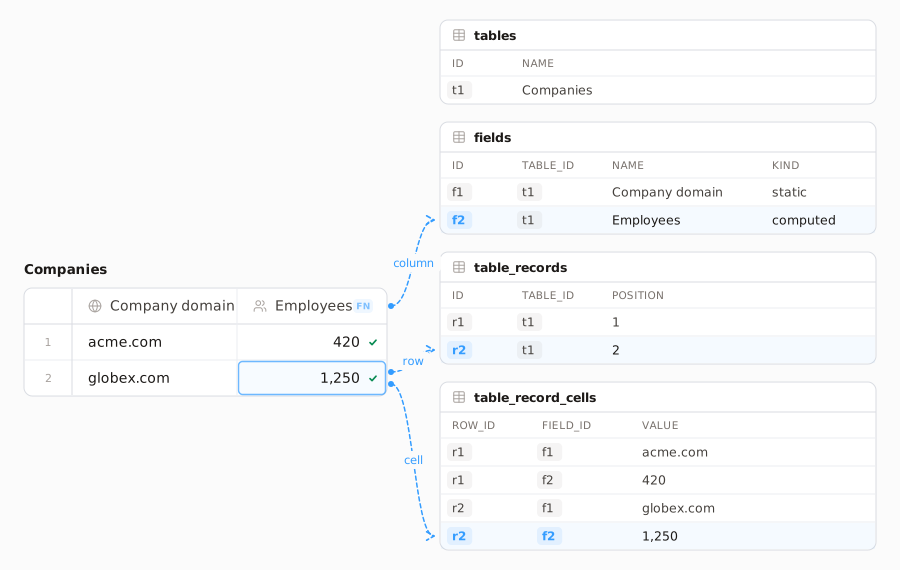
Columns have to change at runtime, and filtering on a cell's value has to be fast, so every cell is its own row in table_record_cells. Adding a column only adds rows, and a filter reaches the value through an index. The cost is that inserting one record writes one row per cell. This is the classic entity-attribute-value layout.
Static and computed columns
A column is either static or computed:
- Static column: holds plain values the user or the agent put there, like a Google Sheets cell.
- Computed column: holds a function and a list of input columns. Each cell is that function run on the inputs from its own row.
In the figure, "Company domain" is static, "Enrich company" turns the domain into JSON, and "Employees" and "Industry" each pull one field out of that JSON.
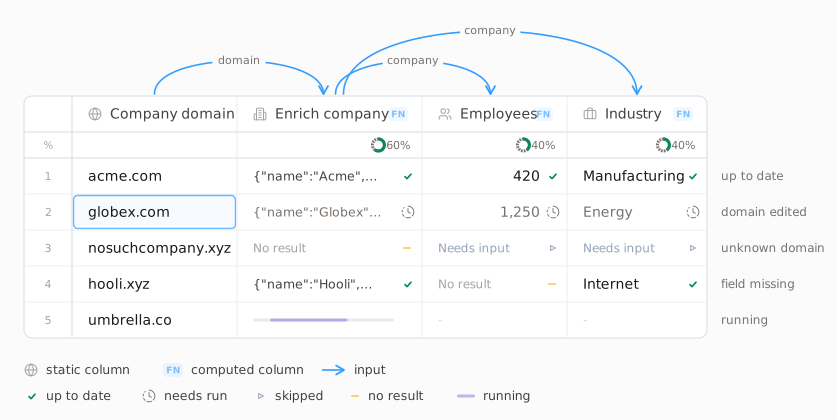
So the question is: for each row, which computed cells are out of date, and which of them should actually run?
Why deciding what to run is hard
Execution happens row by row, so for every record the planner has to decide which of its computed cells should run. Each cell can be in a different state: succeeded, errored, skipped, never run. For each record separately, the planner has to:
- decide which of the record's cells need a run;
- look at the state of their upstream cells;
- run the upstream cells first when an input has not been computed yet.
A cell can go out of date for three reasons: an upstream cell in the same row finished with a new result, an input cell was edited, or new records were inserted and none of their computed cells have run yet. Two of these cases are less obvious than they look.
A rerun can return the same value. If a cell is recomputed and the same result comes back, its dependent cells would produce the same values too. Running them anyway spends provider credits for nothing. So before marking any dependent as needing a run, we have to check whether the value actually changed.
Some dependents must wait for the user. A dependent is not always a cheap extraction column. It can be another provider column, for example one that looks up the company's decision makers from the enrichment result and spends credits on every call. That cell should not rerun on its own, but it still has to be marked as needing a run, because its input changed. Marking the whole dependent tree on every cell update means one large SQLite commit per update, which hurts write performance. Strictly, only the direct dependents need a run, and the cells further down only might need one, depending on what their inputs return. We show both as "needs run" in the UI, and the planner works out during execution which ones actually run.
How we made it cheap
Where we started: a status per cell
Initially each cell in SQLite contained the "needs run" status, and we were trying to manage that status correctly on every cell value change. As we said, managing this means one big commit per cell value change, which also updates the statuses of its dependents. Another issue is the cloud, which I did not discuss yet: for shared tables we would need to sync those status updates to the cloud too, which is another piece of redundant logic. The planner itself then also has to query the cell entities and check their statuses, which is a lot of compute for each cell, and the planner can slow down significantly.
Two steps toward something simpler
Let's start by noticing some simple logic that can reduce those status updates, and go through the designs we considered.
- Mark only the direct dependents. If an upstream cell's value changes, we can mark only its direct dependent cells as pending; the other downstream cells can inherit that pending status at runtime, in memory. This means a single cell value change only updates the statuses of its direct dependents. This significantly decreases the commit size in SQLite, but the planner remains complex: it still needs to track each status per cell. The cloud also has to update the statuses so that team members see the same view.
- Move the status from cells to records. If we remove status tracking from cells and move it onto records directly, so that a record contains the set of field ids that need to run, the planner no longer needs subqueries into cells per record: the record itself says which cells need to run. We can use the same observation as above and keep only the direct dependents' field ids in the set, not all of them. But this means having some set-typed column on the records entity in SQLite and managing it. Queries inside that set (in SQLite it would be JSON) are slow, and the cloud would need to sync it too. All in all this seems way better than cell status tracking, but it is not elegant.
How the planner works with a set per record
Before we continue, let's discuss how the planner works with this approach. Everything below carries over to the final design unchanged; only the data type of the set changes. The planner loads the whole dependency graph in memory; then, when some column is asked to run, it loads each record's set of fields that need a run.
- When the user asks to run field X, which cells need to run? If any upstream field of X is in the record's set, the whole chain from that upstream field down to X must be rerun on that record. In SQL this is just passing a set of field ids and asking for the intersection with the set stored on the record: an AND on sets.
- How do I build the set of field ids that I pass to the query? I take the fields I am about to run and union in all of their upstream fields from the in-memory graph: an OR on sets.
- How do I keep the set on each record up to date? When a cell is computed and its value changes, I remove its field id from the record's set and insert the field ids of all its dependents.
A small detour
Before I started software engineering, I always liked competitive programming on Codeforces, learning algorithms and so on. When I started software engineering, I always wanted to use that knowledge directly in some solution. This is the first time I could use it in the product itself.
Sets are bitmasks
As we discussed the set operations, they looked very much like bitwise operations on bitmasks. Union of sets is bitwise OR, intersection of sets is bitwise AND. This means that if I manage to have a single bitmask instead of a set of field ids, I can use bitwise operations directly and increase performance significantly. For that, each computed field has to map to one bit of an integer. If I use an integer instead of a set, each bit means one field, and in memory I can resolve the mapping between field ids and bits.
So the additional things are: assigning a bit to each new computed field that is not yet in use on that table, having an additional integer on each record which says which fields need to run for that record, and managing those properly. All of the operations then become AND and OR on integers: building the dependency graph in memory, directly returning which fields to run. SQLite queries become bitwise operations on records.
This has a small limit: the number of computed fields per table is 63 if I use a single integer per record, because a SQLite integer is 8 bytes, 64 bits, and we leave the sign bit unused. So we currently use two integers per record, and the limit is 126. I will not go in depth about the bits, because we just map each set operation to a bitwise operation and that's it. It is intuitive, I guess.
Another elegance about it is that we do not need to sync those bits to the cloud either. Each team member can have their own mapping of bits to fields, and when the cell values sync, they redo the bitwise operations themselves. There is no need for changes inside the cloud at all.
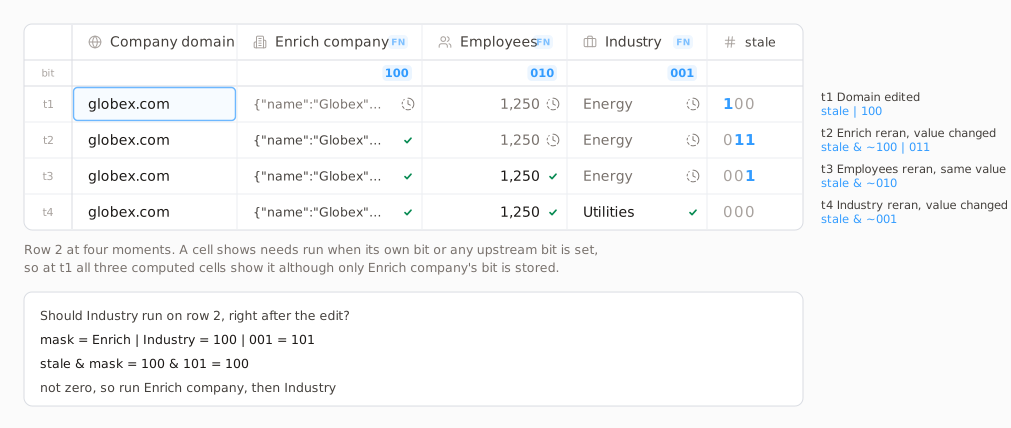
This also solves both complications from earlier. A result that comes back with the same value clears its own bit and sets nothing, so dependents are not rerun and no credits are spent. And the dependent tree is never written out: an update sets only the bits of the direct dependents, and a cell needs a run when its bit is set or any upstream bit is set, which the planner derives from the row's integer and the in-memory graph. One integer per row replaced a status per cell.