Shared Enrichment Tables, Unlimited Runs, No Credits: How We Built GTM Team Collaboration in Revcode

- Engineering
- Infrastructure
- Collaboration
- Inside Revcode
What Revcode is
Revcode is an IDE for go-to-market teams. It is a desktop app for any GTM automation or workflow you can think of: building lead lists, keeping your CRM up to date, writing personalized outreach, and more.
You describe what you want to Claude Code or Codex, and the agent builds it: it creates the tables, writes the column functions, connects the providers, and runs everything across the rows, with every result visible in the table as it lands. Every action in Revcode is exposed to the agent. And because it all runs locally on your machine, running your workflows is free.
Why teams needed collaboration
But until now, Revcode was single-player - a project lived on one person's laptop. Our customers kept telling us the same thing: they needed to see each other's tables.
So the vision for team collaboration was for users to share the exact same projects and tables with their team members, and for everyone to see each other's work in real time. It also had to ship fast, because customers were already asking for it, and because other features were waiting on the same foundation, such as shared memory across the team.
Why collaboration in Revcode is hard
If we compare a Revcode table to a Google Docs table, the Revcode one is far more complex. A cell can be computed from other cells, and those computations run sometimes in big batches and sometimes one by one, depending on the available concurrency. Sharing those updates with teammates in real time brings performance and consistency problems at the same time.
Letting several people edit the same table at once would have meant CRDTs (conflict-free replicated data types), conflict resolution, and optimistic updates. Weighed against shipping fast, we decided not to take any of it on.
On top of that, a team member can be offline for a long time. When they reopen a shared project, they should reach the current state quickly, without waiting through everything they missed.
That leaves us with three requirements:
- No write conflicts, without building conflict resolution.
- Real-time updates for teammates looking at the same table.
- Fast catch-up for teammates who have been offline.
Local execution, cloud-first writes
The one principle we agreed never to break is that execution stays local: tables are SQLite databases on your machine, and columns run there. That keeps large tables fast and local runs free, with no per-action credits. It also ruled out the obvious option of moving shared tables to the cloud and running them there.
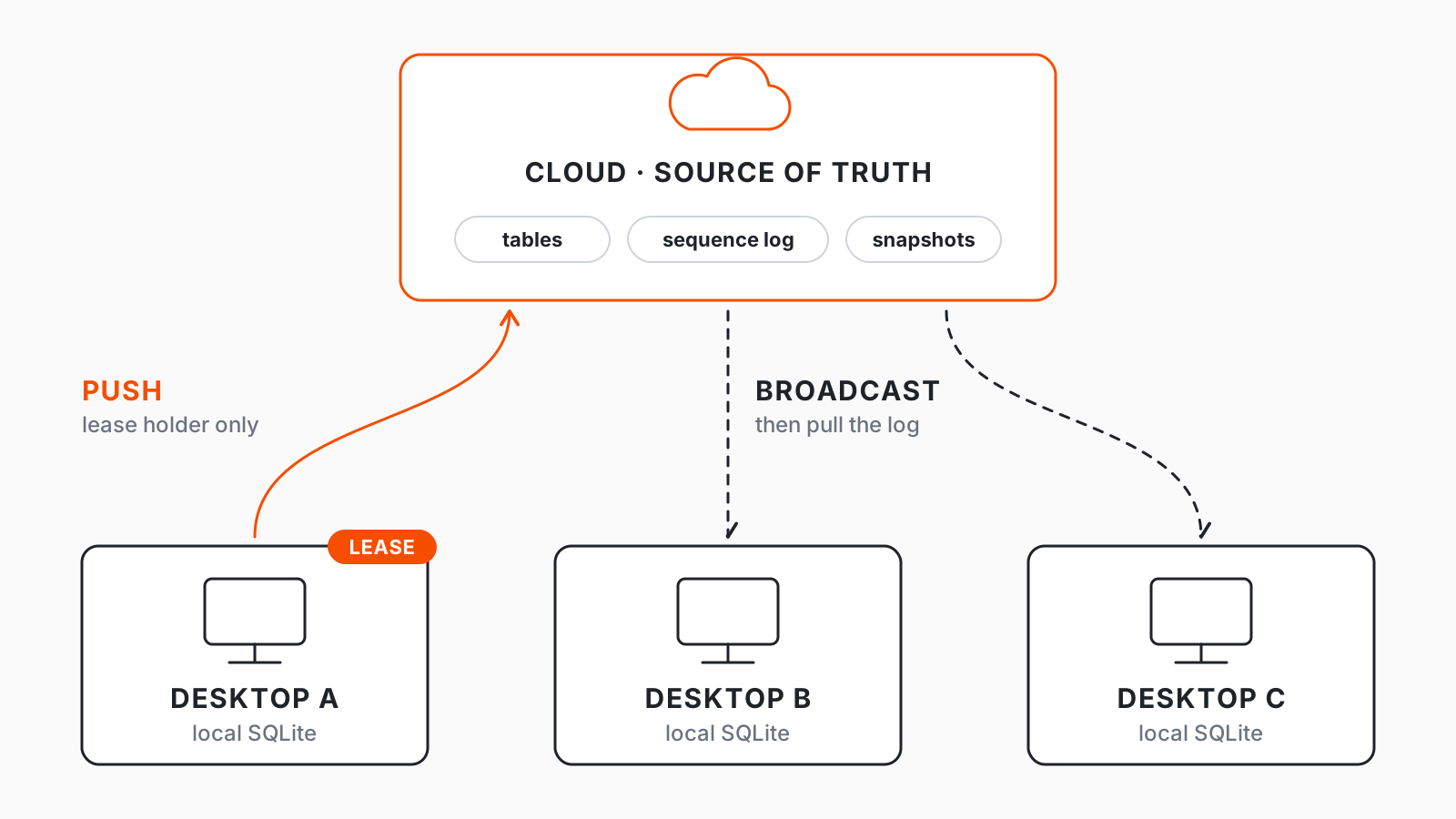
So we kept a full SQLite copy of every shared table on each teammate's desktop, with the cloud as the single source of truth that decides the order of changes. Writes go to the cloud first, and only then land in your local copy. Editing a shared table needs a connection anyway, because only one person can edit it at a time, so writing locally first would gain nothing and leave us undoing changes the cloud refused.
The rest of this post covers how we replicate data between desktop applications, and where we drew the performance line for the first release.
Reducing it to database replication
The schemas (project, table, records, cells) of the cloud database and the local SQLite are almost the same, which makes development and code much simpler. So the problem comes down to database state replication: every desktop keeps its copy in step with the cloud's current state.
Single writer per table
When we started thinking about how to get rid of conflicts, we created a simple mechanism for a single writer per table. Each team member who wants to edit a table must first take a lease on it, and that lease is broadcast to the other team members so they know someone is already editing the table. With only one writer at a time, there is nothing to merge.
The sequence log
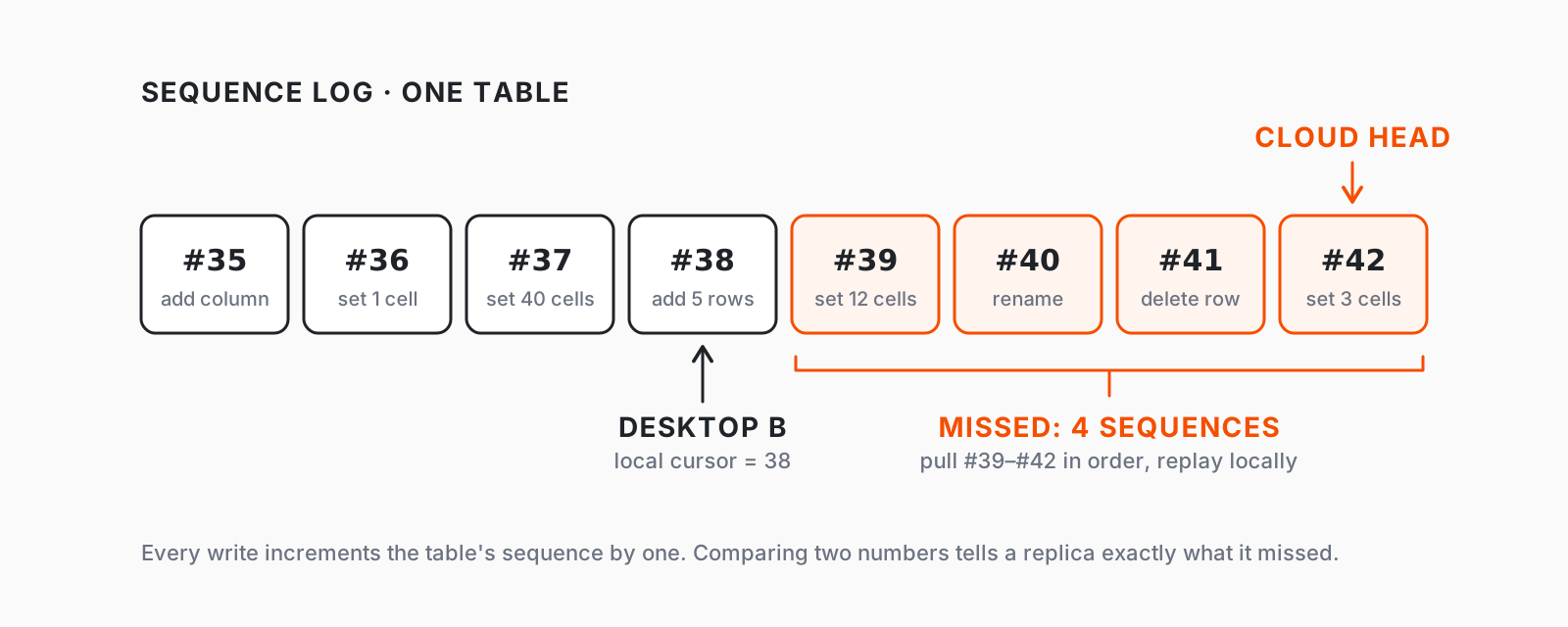
The decision with the biggest impact on simplicity and on achieving eventual consistency was introducing an incrementing sequence number (think of it as a transaction number) for each write operation on a table. Each edit to a table increases that sequence number by 1 and is logged in a sequence log outbox.
Team members looking at a stale table can identify the changes they missed by storing their current sequence number locally and comparing it with the cloud's. This makes eventual consistency simple: you have the whole ordered log (a transaction journal) that you can fetch from the cloud and replay locally.
But it also leads to serious performance issues if you map one local transaction to one sequence. The rest of this post is about the two paths that share this foundation but need different solutions:
- The real-time path - teammates are online and a few sequences behind.
- The catch-up path - a teammate was offline and may be thousands of sequences behind.
The real-time path
Optimizing reads with caching
If multiple team members are looking at the same project and one of them is making changes, all of the others have to pull exactly the same sequences from the database. To get rid of that redundant fetching, we cache the sequences, and each pull request reads directly from the in-memory cache.
To go further and skip fetching for really small sequences, we include the data directly in the websocket message when the sequence payload is small enough. So almost every real-time update falls into one of two cases:
- Large sequence: after an update, the new sequence head is broadcast to all team members. After processing the websocket message, each of them makes a pull request, which is served from the cache.
- Small sequence: the payload is inside the websocket message, so team members skip the pull request and update local state directly.
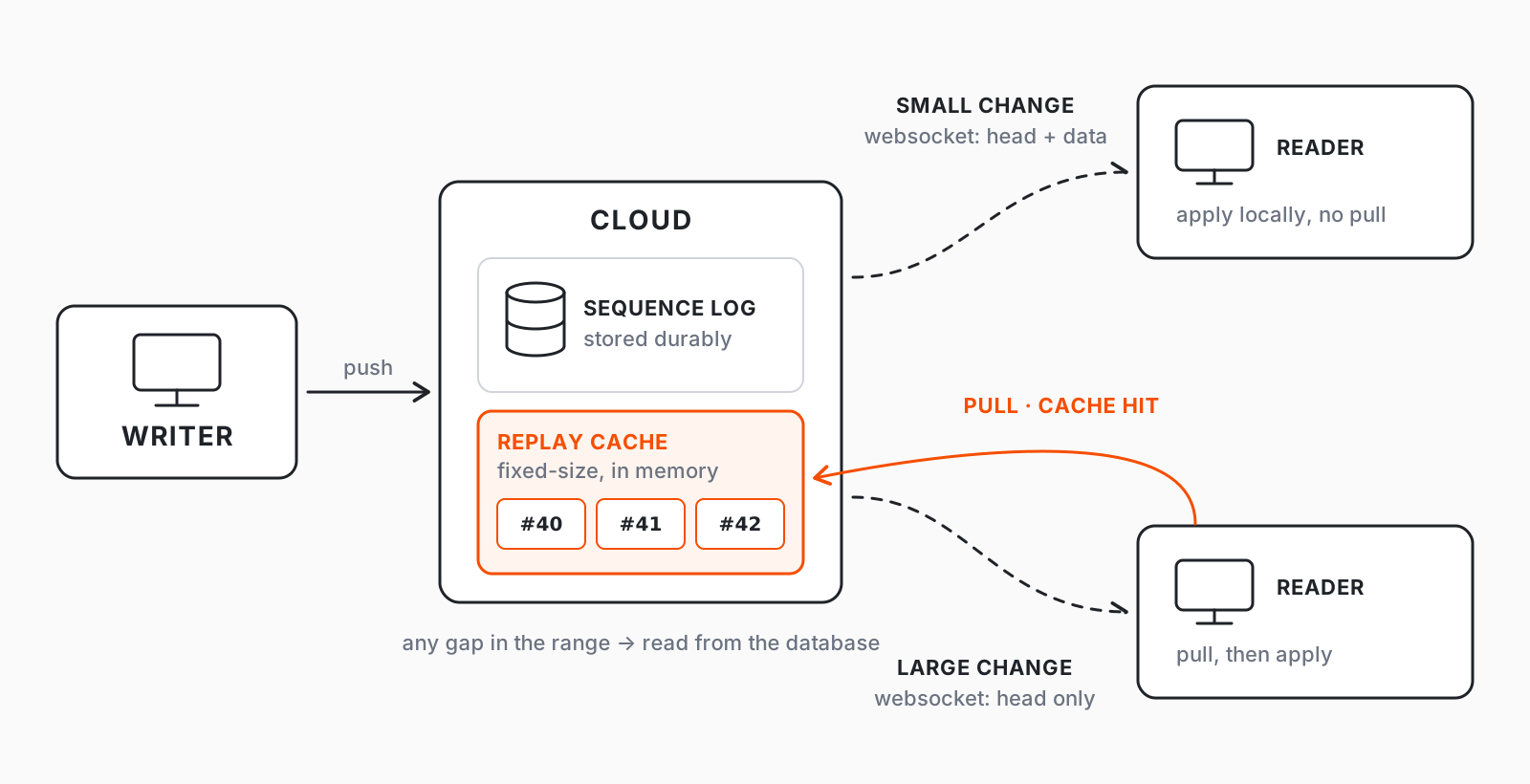
With this approach, real-time updates always either read from the cache or update locally from the websocket message. The cache holds a fixed-size in-memory replay stack and has a reconciliation mechanism on read: if even one sequence in the requested range is missing from the stack, we fall back to the database.
Merging sequences on the reader side
When a replica fetches multiple sequences at once, most of them can be merged in memory. We replay the changes in memory and apply them as one big batch, instead of doing many local writes. This significantly reduces the number of local transactions and removes redundant work, such as updating the same cell twice.
The catch-up path
Snapshots
Pulling and applying sequences one by one cannot be the path for a team member who has been offline for a while. That's why we introduced a snapshotting mechanism. At intervals, it snapshots the current state of the table in the database and writes the table's records and cells in a gzipped format to a storage bucket. When the team member reconnects, they download that gzipped file and rebuild the whole table from scratch using the import functionality we already had.
When to replay and when to snapshot
Since sequences can be merged locally, pulling many sequences together is better than pulling them one at a time - but only up to a ceiling. Sometimes the missed sequences grow so large that it is better to just download the snapshot and import it.
We decided to track the total bytes that need to be pulled as sequences. If that exceeds some threshold of X bytes, we rebuild the local table from the snapshot instead. There are many other things to consider here, and the calculation can get more complex, but in practice snapshots are the rare path, used mostly when an offline team member needs to catch up.
The write path: merging local writes into sequences
Some providers have such a low concurrency limit that there is no option other than uploading cell changes in batches of 1-5. That means roughly 8k sequences for 20k cells. Pushing a sequence requires validation and carries a large payload, so there is a big gain in batching those cells into the same sequence.
One option would be to wait a fixed number of milliseconds, group changes locally, and push one big sequence - but that adds latency to every write, which is unreasonable. Instead, while one push is in flight, the client merges incoming local transaction writes into a single pending sequence. Only one push executes at a time, carrying whatever local batch has accumulated.
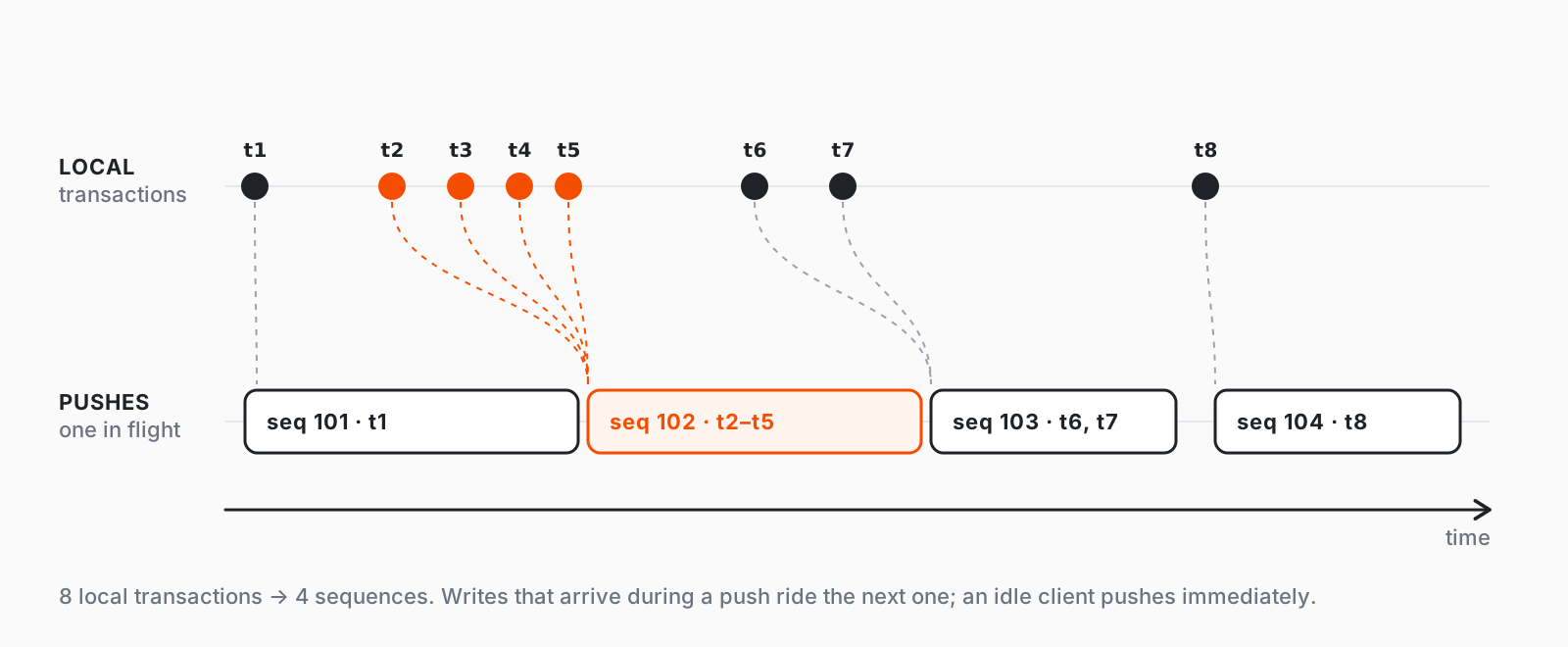
So there is no longer a one-to-one mapping between a local SQLite transaction and a cloud sequence. This significantly reduces the number of sequences and pushes. Implementing it was simpler than expected, because we could reuse the same merging logic we built for the read path.
Current bottlenecks and what's next
The current bottleneck on the write path is that each push directly takes a database connection and runs a transaction, which can add delay. This can lead to serious database load and connection pool exhaustion. Because each user can have only one write in flight per table, this is acceptable for now. In the future we want to move to process writes asynchronously, which will make things considerably more complex.